
A free tool to modify your PC’s volume settings
Sound Lock is a free utility tool that limits the sound output coming from your PC. It lets you 'lock' the maximum volume to a preferred level, which is great for watching movies or shows, as the software automatically adjusts loud playback sounds to prevent sudden noise spikes while remaining audible.
Top Recommended Alternative
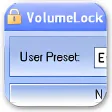
Sound Lock works quickly and allows you to adjust the settings of up to 14 channels. The software also sits comfortably in the system tray and lets you create dedicated volume settings for different output devices. Compared with alternatives like Volume Control, VolumeLock, and Speaker Locker, Sound Lock is easier to use.
What is Sound Lock?
Sound Lock is a simple utility tool that you can use to modify and personalize the volume of your computer. It’s a program that can help you adjust the volume such that the loud scenes in a movie or a show aren’t too loud, and the quiet scenes aren’t too quiet. It helps you in adjusting the volume of your PC to a level where you can comfortably hear dialogs without having the loud background sounds disturb others.
Once you complete the Sound Lock download, you will be able to use it quickly and without rummaging through several applications. The software sits on the system tray, allowing you to set and modify the maximum volume. When you start watching a program, the software will continually monitor the audio to ensure that the sounds don’t go above the fixed volume that you’ve assigned.
This means that you will easily be able to hear the low-volume sounds clearly, while the software will automatically turn the volume down whenever there are loud sounds. Additionally, Sound Lock is lightweight and comes with various configurable settings that you can tweak to your preference.
Is Sound Lock user-friendly?
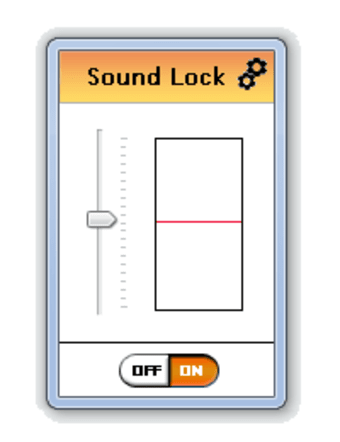
One of the best things about Sound Lock is that it is easy to use. The software features a user-friendly interface that lets you limit the audio by dragging the limit reference bar to your preferred level. After this, whenever the Sound Lock application is active, it will automatically change the level of the output to fit the set parameters.
In case you want additional settings, you can click on the Settings icon available. From here, you will be able to configure different channels and get the sound that you desire. Additionally, you can edit the settings on your computer so that the software gets activated the moment you open your Windows computer.
What are the features of Sound Lock?
Sound Lock is an advanced audio software that comes packed with a range of features needed to update the volume of your Windows PC. Once you open the dashboard, you will be able to adjust the volume of your computer for different channels. You can update up to 14 channels, thereby ensuring smooth audio even when listening to loud sounds.
Apart from modifying the output of your desktop’s speakers, Sound Lock download also lets you modify the sound limit of every output device connected to your computer. This means that the software will work on connected headphones and speakers. Once that’s done, you will be able to modify the playback volume of movies, shows, and games regardless of the output device.
Additionally, the software comes with various configurable settings that you can adjust as per your preference. The software lets you select the preferred filtering option - channel or master, and update different parameters for different output devices. Moreover, the application can run on top of other applications without much effort.
Is Sound Lock available for free?
Sound Lock is a free application that works well on all Windows versions. It’s so lightweight that it requires less than 4MB of RAM. The software lets you drag the bar to the desired level and then automatically adjusts the output as per the fixed volume. It also lets you update the settings of up to 14 channels, including the master channel. Furthermore, you can use the tool to adjust the volume of specific channels or devices.
Should I download Sound Lock?
If you’ve ever wanted an application that could lower the volume of loud scenes while ensuring that the quiet scenes remain audible, then download Sound Lock. It’s a handy utility tool that can limit the volume of playback by detecting loud noises and lowering them to the desired level. It also provides various features that can help you adjust the volume of different channels and set dedicated output levels for different devices.